










The Assign Daily Snapshot is a new Medaptus Assign module that automates daily patient assignment summaries for hospital medicine teams. By eliminating manual morning emails and consolidating provider coverage, patient highlights, and cross over notes into one report, the Daily Snapshot helps teams improve efficiency, accuracy, and communication—so clinicians can start the day aligned and prepared.
Simplify Daily Patient Assignment Communication
Daily patient assignments are critical—but communicating them shouldn’t be a time-consuming or manual process. After using Assign, our automated patient assignment software to run their morning assignments, many hospital medicine teams still rely on handwritten notes or typed emails each morning to summarize assignments, patient counts, and send out the updates to their Care teams.
The Assign Daily Snapshot was designed to replace that workflow with a fast, automated solution. Once assignments are approved, the Snapshot instantly generates a clean, professional summary that can be shared with physicians and staff in seconds.
“We have medaptus being used at our hospitals that run a census of about 150 to upwards of 650 patients. We communicate out, we want the group to know what’s going on in the hospital, how many new admissions coming in, how many of them have had H&Ps completed by the night group, how many are still pending admissions, all that type of information. They’re taking that information from medaptus and typing it in emails,” said Chad Robertson, Regional Director, Texas Health Resources.
“When you come into a list of 16, 20 patients, where do you start your day? We’ve prioritized three areas we want them to focus on: H&Ps, discharges – we want to get the discharges out, anyone who is safe to go out, should get those orders in, and any patients that have deteriorated over night,” he said. “We want to ensure we don’t have any gaps or delays in patient care.”
“The biggest pain point in typing up the emails is the time and human error component. What we’re excited about with this rollout is it will take away that manual typing of information with those cross-coverage notes,” he said.
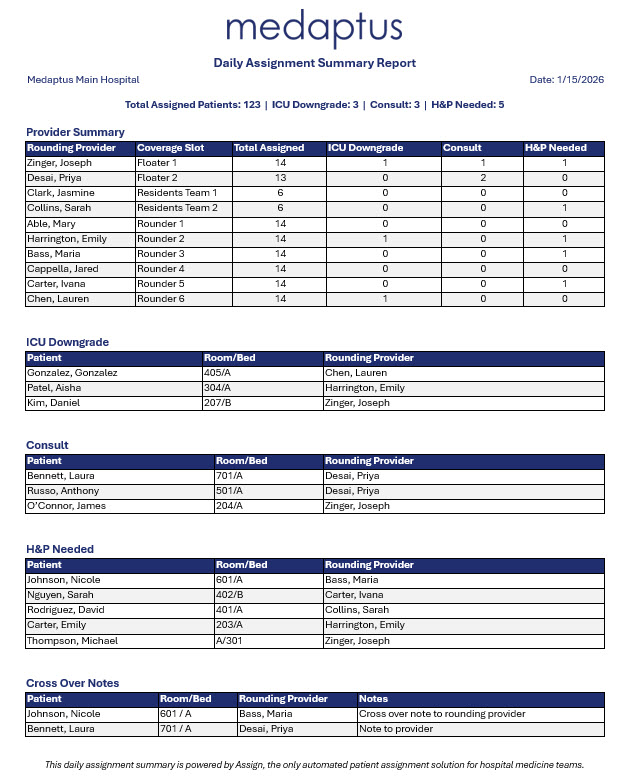
Here’s what is included in this new module:
Automated Provider Coverage and Workload Visibility
The Provider Summary section gives teams an immediate view of daily coverage, including:
- Scheduled providers
- Coverage slots
- Patient counts per provider
Teams can also configure the Snapshot to display specific patient types—such as new admits, consults or ICU downgrades—in separate columns. This helps leaders and clinicians quickly understand workload distribution and case mix without additional reporting.
Highlight Priority Patients Without Searching the Census
The Assign Daily Snapshot can be configured to highlight key patient indicators in dedicated sections. These sections display priority patients along with their room, bed, and assigned provider.
By surfacing important patients upfront, providers no longer need to search through a full patient census. The result is faster decision-making and clearer alignment on daily priorities.
Improve Handoffs with Built-In Cross Over Notes
Effective handoffs are essential for continuity of care. The Cross Over Notes section allows clinicians, especially nocturnists, to document important patient information for the next assigned provider.
These notes can be entered throughout the night or added in the morning, giving teams a reliable way to communicate critical context without digging through patient charts.
Export and Share in Word or PDF
The Assign Daily Snapshot is designed for easy distribution. Users can export the report as a Word or PDF document and attach it to an email to get the information to Care teams.
To ensure information stays current, the Snapshot automatically clears each evening, making it ready for the next day’s assignments and overnight notes.
See it in action: Watch the webinar recording where we shared a preview of this new module, along with insights from our customers at Texas Health, who shared why they wanted this module and how they plan to use it.
FAQs
1. What is the Assign Daily Snapshot?
The Assign Daily Snapshot is an automated reporting module that generates a summary of daily patient assignments, replacing manual morning emails with a single, easy-to-share report.
2. How does Assign Daily Snapshot save time?
By automatically pulling assignment data once assignments are approved, the Snapshot eliminates the tedious task of retyping the assignment information in an email, repetitive documentation, and reduces the risk of outdated or missing information. It also reduces the time it takes providers to prioritize their patients; the snapshot calls out these patients so providers can jump right into their day.
3. What information is included in the Snapshot?
The report includes daily census count, provider coverage details, assignment counts, configurable patient indicators, and cross-over notes to support clear communication across care teams.
4. How can teams share the Snapshot?
Teams can export the Snapshot as a Word or PDF document and distribute it via email or existing communication workflows.
Get the latest updates and news delivered to your inbox.
Subscribe to our newsletter today.