
Blog Summary
Hospital patient assignment uses two primary models: provider-based (patients assigned to individual attendings scheduled for the day, with team info managed at the scheduling level) and team-based (patients assigned to a named Care Team that persists through the stay, with individual providers rotating on and off the team). Provider-based assignments are simpler to implement but can create communication gaps between the scheduling system and the EHR. Team-based assignments offer richer EHR visibility and easier communication for nurses and case managers, but require EHR-level configuration. A hybrid model combines both. Medaptus Assign supports all three approaches.
During a patient’s “journey” in the hospital, they may be seen by many different caregivers: Admitting, attending and subspecialty providers, just to name a few. This can be an overwhelming experience not only for the patient but for the hospital itself. Typically, registration does a good job of trying to keep up with all the moving parts throughout the patient’s stay. However, we are starting to see the hospital medicine team take control of this process and move from provider/attending-based assignments to a team method of patient assignments, or even a hybrid model of the two.
Let’s dive into the differences between provider/attending-based assignments and the team method of patient assignment and what might be a fit for your hospital.
Which Patient Assignment Model Is Right for Your Hospital: Provider-Based, Team-Based, or Hybrid?
What Is Provider-Based Patient Assignment?
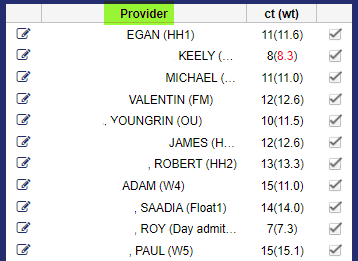
The traditional way of assigning patients to providers in a hospital setting is through provider-based assignments. In this scenario, patient assignments are dependent on which attendings are scheduled to work for that day. What we’ve increasingly seen is that hospitals then assign providers to a specific team for a given day, for a variety of reasons:
- This helps organize who is working where
- It can improve the hand-off or sign out process – you have a new provider taking over all that team’s patients, so they do one hand off instead of multiple hand offs
- It helps the list maker have some rules, whether using a patient assignment software like ours, Assign, or doing patient assignment manually. For example: some hospitals will have a float team. Now the list-maker knows that this provider is part of a float team and they can get anyone – easy to assign patients to any provider on a float team. Or perhaps it’s a geographic team – like “Team West 7.” These providers should only get patients on West 7.
However, in this model, since this type of team information is done at the scheduling level, you wouldn’t see this in the EHR.
What Is Team-Based Patient Assignment?
We’re seeing more and more of our clients opt for a team method of patient assignment. In this type of patient assignment model, a patient is assigned to a Care Team. The patient never changes teams; however, the individual care members on the team (attendings, NPs etc.) may change.
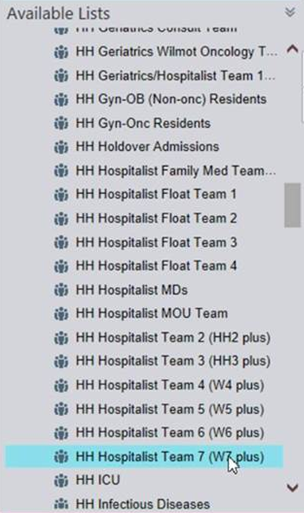
In the team method of patient assignment, you assign a patient to a team and then build the care team around it. Since the patient is always staying on the care team they were assigned to, this tends to be an easier way to get updates and communicate changes; such as:
- Easier for other groups in the hospital to communicate, look up provider information, and cover
- A nurse or case manager doesn’t need follow a specific doctor, they can follow a team instead
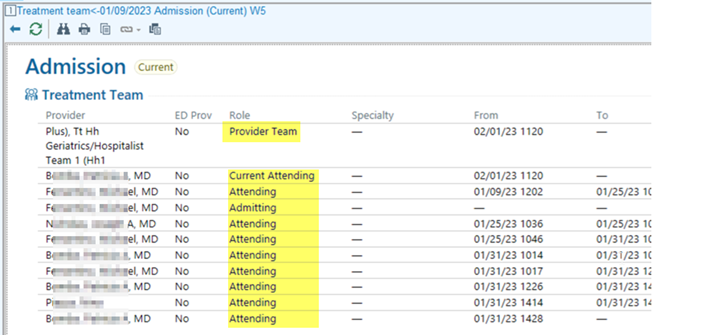
Table 1: Provider-Based vs. Team-Based Patient Assignment

Which model fits your hospital? There’s also the option of a hybrid model between the two. You assign patients to providers/attendings; you send that information outbound to the EHR; and then you can also assign that patient to a team.
How We Can Help, For Provider-Based or the Team Method of Patient Assignment Models
Often times, hospital systems and workflows were all implemented at different times, in silos. What ends up happening is the real impact of how each system impacts the other and how they need to work together is not truly considered until the problem is exacerbated.
So what can we do to help solve this problem?
The first step is to analyze your different systems and identify how they would ideally work together and the best way to improve it. For example, we can map schedule team data to provider data to treatment team data, to have them in sync and talking to each other. Our interfaces and flexible integrations make this possible – turning siloed systems into one unified, in sync source of truth.
This really improves your entire patient assignment workflow – from how providers are scheduled to how patients are seen by whom and when.
Through mapping and a customizable outbound interface, medaptus lets you create your assignments in our system while keeping all the data in sync in your EHR without human intervention, a true labor savings benefit.
For example, let’s say Dr. Jones is on Team 1 (Qgenda) and assigned to Team Blue in Epic. Our outbound interfaces means we do the patient assignment process and automatically update the patient and team information in your EHR, so it’s visible to whoever needs to see it.
The key benefits:
- Instead of taking 2-3 hours to create your daily rounding lists, it gets done in a few minutes
- That means that vital information on which patient is assigned to which provider, gets communicated downstream throughout a hospital, quicker
- That means nurses are not waiting for attending information to put in orders or start seeing patients
- It means providers and nurses know who to see and speak to right when their shift starts
- Ultimately, it improves patient care and keeps your providers happier, too
Conclusion
There are so many different hospital systems that impact the creation of your daily rounding list. Often these systems are disparate and unorganized — a schedule workflow, an attending workflow, a team concept — all implemented at different times, in silos. medaptus takes a consultative approach to this problem: analyzing your different systems, identifying how they would ideally work together, and mapping schedule team data to provider data to treatment team data — turning siloed systems into one unified, in-sync source of truth.
Want to see what an improved attending-based or team method of patient assignment might look like for you? Get a demo of Assign here.
FAQs
What Is the Difference Between Provider-Based and Team-Based Assignment?
Provider-based assignment assigns patients to a specific attending scheduled for that day, with team structure managed at the scheduling level. Team-based assignment assigns patients to a named Care Team in the EHR, with individual providers rotating on and off the team. The key difference is where the data lives — scheduling software vs. the EHR — and who can see it.
Can medaptus Support Both Models at the Same Hospital?
Yes. Medaptus Assign is built to support provider-based, team-based, and hybrid models. Through its customizable rules engine and outbound interfaces, it can map schedule team data to provider data to EHR treatment team data — keeping all systems in sync regardless of which model you use.
Which Model Is Better for Academic Medical Centers with Teaching Teams?
Team-based assignment tends to work better for academic medical centers, because the team structure accommodates multiple provider types (attendings, residents, APPs) and supports continuity requirements for teaching teams. Medaptus Assign handles team-specific logic and protects teaching continuity through configurable rules.
How Long Does It Take to Build Daily Rounding Lists Without Automation?
At most hospitals, building rounding lists manually takes 1–3 hours each morning. With medaptus Assign automating the process, this is reduced to a matter of minutes — and assignments are continuously updated throughout the day as the census changes.

About The Author
Jeff Cibotti is a Senior Solutions Consultant at medaptus with nearly 15 years of experience in healthcare technology. He specializes in hospital medicine workflow, patient assignment automation, and EHR integration.
Get the latest updates and news delivered to your inbox.
Subscribe to our newsletter today.